Manage Invoices Online with DHL MyBill


 Share
Share
Ship internationally with ease using DHL Express. Our global network extends to over 220 countries. We handle every step of door-to-door shipping from customs clearance to delivery to make sure your shipments arrive fast, safe, and on time. Whether you're sending documents, small parcels, or heavy freight, we've got it handled.
Handle Your Invoices Digitally
Whether it’s managing your invoices and receipts, keeping paper records, making bank transfers, or checking your statements, there’s a lot that goes into managing your business. It can easily become overwhelming, and mistakes can be costly. DHL eliminates these hassles.
Go Digital to Boost Efficiency
With DHL MyBill you can handle everything online: check quotes, make payments, track shipments, manage invoices, and even generate detailed reports.
Our interface is user-friendly and available in multiple languages. It works with Microsoft Edge, Google Chrome, Firefox, and Safari on all kinds of devices, making it easier than ever to manage your bills.
What you can do with DHL MyBill
DHL MyBill allows you to:
- View and download invoices and shipping documents
- Check payment status
- Check payment history
- Submit questions about specific invoices and charges
- Receive email notifications for new invoices automatically.
- Automated delivery via SFTP (Secure File Transfer Protocol*)
- Estimate shipment costs and delivery times
- Link invoices to shipment details
- Create custom CSV reports
*SFTP: An end-to-end encrypted communication protocol to securely transfer your files. It’s the most standard way to securely send and receive files and data over the internet.
Streamline your Business with DHL MyBill
DHL MyBill saves time, reduces errors, and makes downloading shipping documents easy. It also complies with Japanese laws on Electronic bookkeeping and data storage. Best of all, it’s completely free.

Try DHL MyBill for Free
For those of you who are first time users of DHL MyBill*, let’s take a look at registration, settings, and the basics of how it works.
*Some parts of DHL MyBill may not be available even with an account number.
How to Register for DHL MyBill
Click “Sign-up to MyBill” to start registering a new account.
Fill in the billing country and your DHL Express account number, then click “Continue.” (If you don't have a DHL account number, you'll need to apply for DHL Express.)
Enter the needed fields on the MyBill registration form. (*Please enter all required fields.) Then click “Save and Continue.”
Once you complete registration, you will receive a confirmation email.
Click the email link to move to a screen where you type in your password.

Once you put in your password, it will say, “Welcome to MyBill”, and your login will be complete.
Basic User Guide
Amount Billed
You can view information on unpaid invoices.
Invoices Under Inquiry
You can check invoices under inquiry with DHL.
Overdue Payments
You can view information on past-due invoices.
Post-Payment Management
Once an invoice is paid, you will be automatically taken to the Invoice History screen from the dashboard.
All invoices displayed on the Invoice History screen have been paid. Please use this screen for reference or to access data.
Download Invoice Data
Invoice data can be downloaded in CSV format. Select the necessary fields and click the “Search” button to create a report and easily manage and analyze your data.
Downloadable files are shown on the “Archive” and “Search” screens. However files are deleted after 12 months, so we recommend downloading well in advance.
How to Change Your Settings
| User Information | : | You can change your name, phone number, and language. |
| Change Password | : | You can change your MyBill password (*Note: this is separate from your MyDHL+ password). |
| My Accounts | : | A list of all your accessible DHL Express accounts is shown, allowing you to verify the permissions for each one. If you have administrative privileges, an “Admin Button” appears on the management screen. Clicking this button lets you view a list of permissions for the account, such as user management and inquiry permissions. You can also select your preferred invoice receipt method on this screen. |
| Unpaid Invoices | : | Shows a list of currently unpaid invoices |
How to Search for Invoices, Track Shipments, and Make Inquiries
You can easily search for invoice or shipping form (also called a waybill) data by setting search criteria. You can filter by the following conditions:
 DHL Express Account NumberInvoice TypeInvoice NumberStatusShipping Form (Waybill) NumberInvoice Date
You can also save your search criteria. If you want to search using the same criteria again later, enter your search terms and save them with a name to find them quickly next time.
Clicking the invoice number of a shipment displayed on the dashboard switches to the invoice screen, displaying the waybill information.
Clicking the “Waybills” tab displays a “Tracking Button” next to each shipment, allowing you to check its delivery status.
You can also print waybills and billing-related documents from the dashboard.
How to Download an Invoice
Single Invoice
Click the invoice number and press “Download” to display a list of available documents. Select the documents you need and download them.
Multiple Invoices
To download multiple invoices, check the boxes next to the invoices you wish to download, then press the “Download” button.
Easily estimate rates and calculate transit times
Based on the rates contracted in your account, you can estimate rates and calculate transit times.
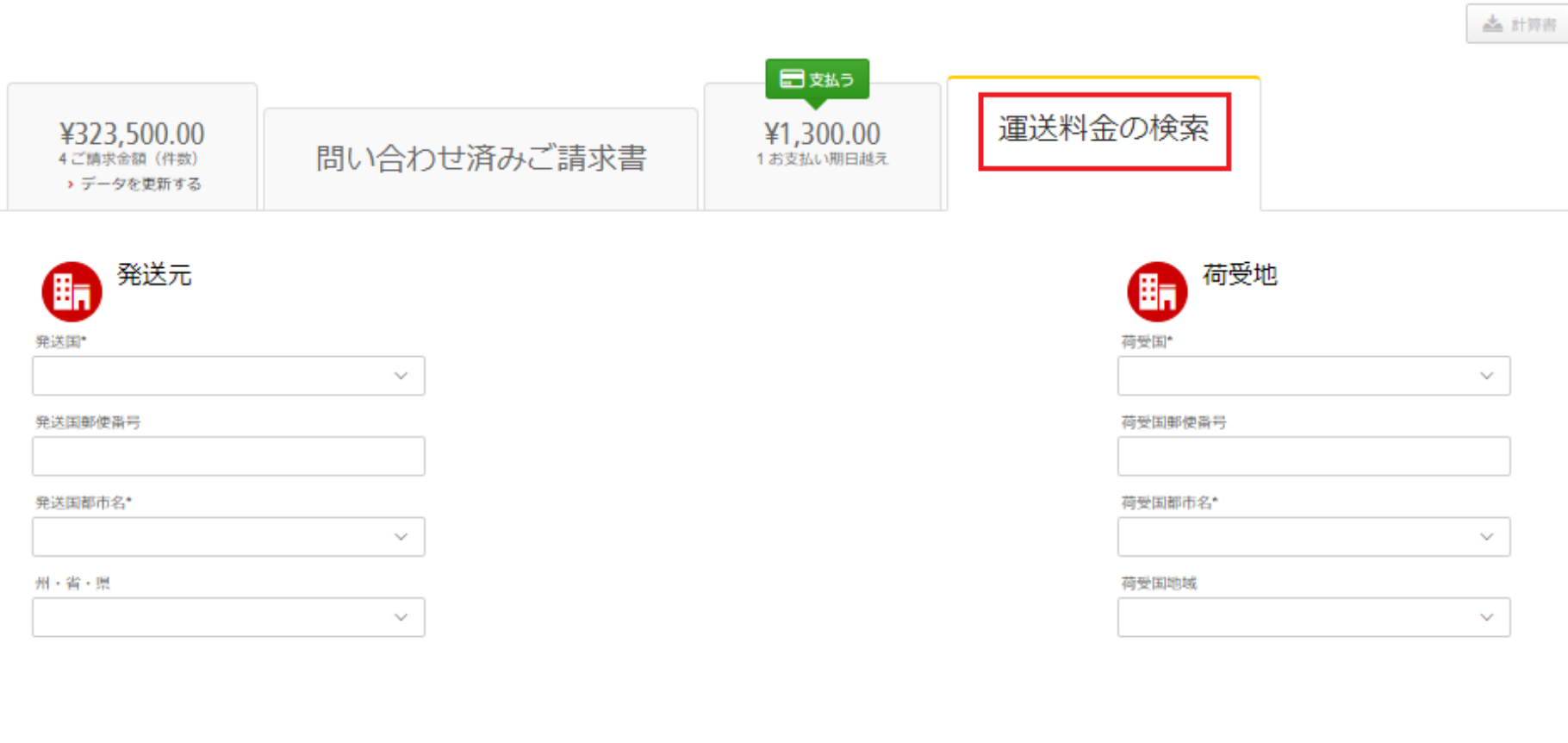
First, click the “Search Shipping Rates” tab on the dashboard screen and enter the necessary information.
Fill in fields with an added asterisk “*” if you’re unsure about the exact amounts.
Full Support for Peace of Mind
How to Use DHL MyBill
Detailed manuals for DHL MyBill users and administrators are available for download.
Support
You can inquire about invoices and shipping documents by phone or email. Please feel free to contact us if you have any questions or need assistance.