For Business Customers
Check Shipping Rates and Delivery Times with MyDHL+


 Share
Share
With MyDHL+, you can easily view estimated shipping costs and delivery times.
(If you have a DHL account number, your estimate will be generated using your registered account information.)
How to Get an Estimate

From the top menu, click “Ship”, then select “Get a Rate and Time Quote”
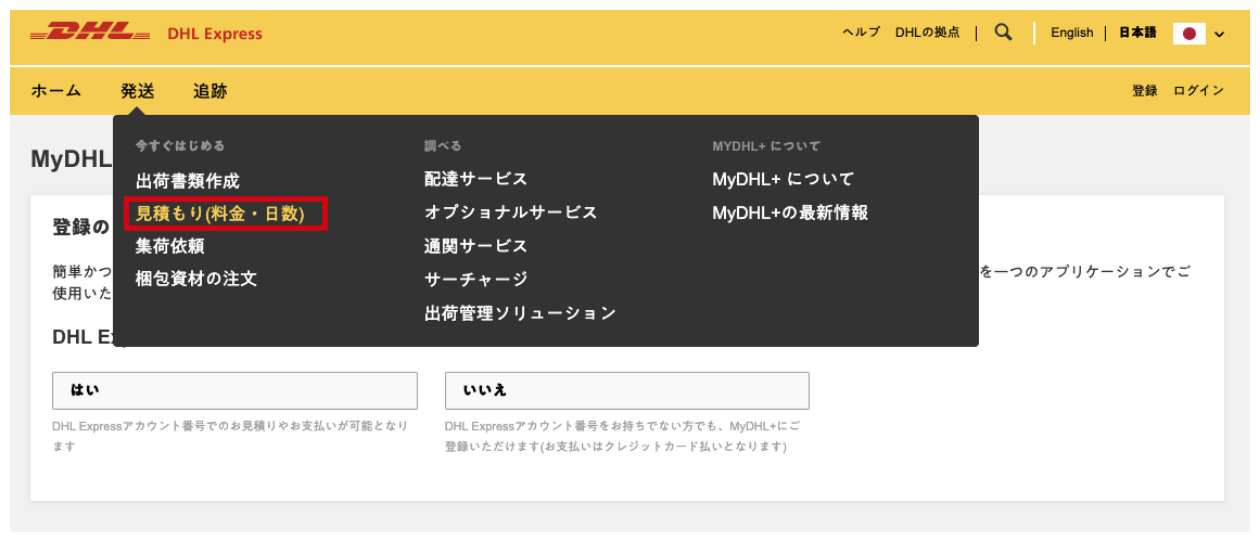


Under the “From” (origin) and “To” (destination) fields, enter the country, address, and postal code of your shipment.

Select your shipment type from “Documents” or “Packages”, then enter the packaging type, quantity, weight, and dimensions accordingly.

If you are logged in, select your Account Number from the dropdown menu.
(If your account number is not displayed, go to My Shipment Settings → My DHL Accounts from the menu in the upper‑right corner and register your account number.)

Once all information is entered correctly, click "Get a Quote" for a quick estimate on your shipment time and delivery rates.
Please take note of the following:
- The rates shown are estimated charges based on the weight and dimensions you enter.
- Additional fees (taxes, service charges, etc.) may apply.
- Delivery dates and rates displayed are provisional and may differ from the final results. DHL cannot be held responsible for discrepancies.
- Final delivery times and charges may vary depending on the shipment type, additional services selected, and the actual packaging.
- After pickup, DHL will re‑measure dimensions and re‑weigh the shipment at our facility. The final billable weight may differ from what you entered.
- All shipments are subject to the DHL Express Terms and Conditions of Carriage.