What is Authorised Account Usage?
In MyDHL+, you can authorise others to ship for you without giving them your account number.
You can apply restrictions to control how they use your account number if you wish.
- Protect your account – by masking the account number or using a nickname.
- Hide your account rates – from business partners, suppliers and customers as needed.
- Apply shipment restrictions – allowed addresses, maximum number of pieces and weight
If you grant authorisation to users who are not registered in MyDHL+, they will be prompted to register before creating shipments.
eSecure
If the user creating the Authorised Account Usage is an eSecure Account Admin, then the Authorised User will not need further authorisation via eSecure before they can ship.
If the user creating the Authorised Account Usage is not an eSecure Account Admin, then they should ask the eSecure Account Admin for the account number to authorise the user within eSecure proactively. If this is not done, when the Authorised User tries to ship, they will have to wait for the eSecure Account Admin to approve them which could cause delays shipping.
How to configure
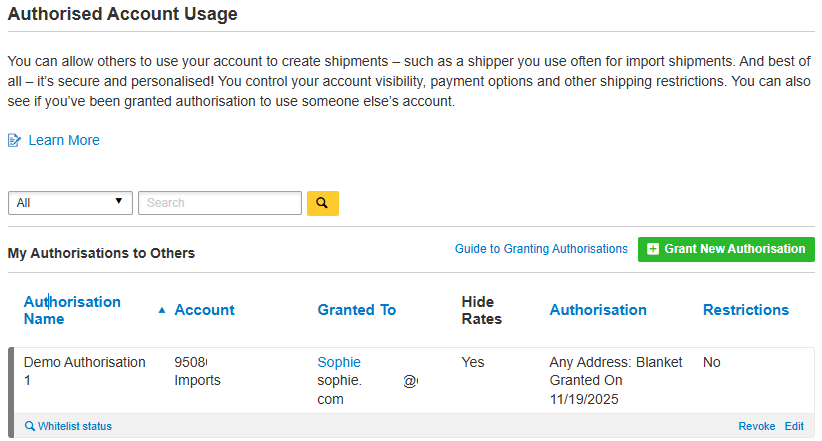
Browse to My Shipment Settings > Authorised Account Usage
Click Grant New Authorisation
Complete the required information and select and configure any restrictions you would like to apply.
Add any message you would like to include in the authorisation email and then click Save and
Send Authorisation.
Your authorised user will receive an email confirmation, with a link to either log into MyDHL+ or register. Your account number will then be available for them to use, subject to any restrictions you applied.
For complete control of your account, you can edit or revoke authorisations at any time. The authorised user will receive an email confirming that their authorisation has been updated or cancelled.
What the Authorised User will see
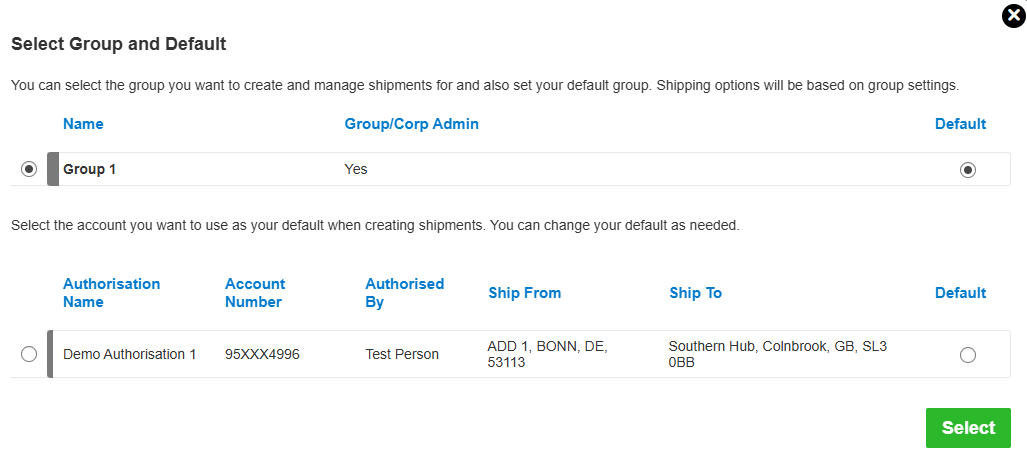
To ship as the Authorised User, click on the group name in the grey bar at the top of the page.
Next, select who you would like to ship as and click the Select button.


 Share
Share
Similar Stories